Tuesday, February 03, 2015

My Linux Setup

Bootable USB using Startup Disk Creator

Window 8.1 & Ubuntu 12.04 Dual Booting by using Boot-Repair

$ sudo add-apt-repository ppa:yannubuntu/boot-repair
$ sudo apt-get update
$ sudo apt-get install boot-repair

!!! Read the guide carefully

Recover Grub using grub rescue

grub rescue > ls
(hd0) (hd0,msdos5) (hd0,msdos3) (hd0,msdos2) (hd0,msdos1) (hd1) (hd1,msdos1)
grub rescue > ls (hd0,msdos1) # try to recognize which partition is this
grub rescue > ls (hd0,msdos2) # let's assume this is the linux partition
grub rescue > set root=(hd0,msdos2)
grub rescue > set prefix=(hd0,msdos2)/boot/grub # or wherever grub is installed
grub rescue > insmod normal # if this produced an error, reset root and prefix to something else ..
grub rescue > normal

Dual Graphic Cards Setup

Korean Input Setup

1. Dash Home -> Language Support -> Install/Remove Language -> Install "Korean"


2. Right Click Upper-right side "Keyboard" Button. -> Restart


3. Right Click "Keyboard" Button -> Double Click "preference" -> Show IBus Preference -> Check Input Method


Utilities

  • apt-file : for searching packages including files to install
    • apt-file search <file_name>
  • apt-cache :
    • apt-cache show <package_name>
  • gnome-color-chooser
    • for customizing ubuntu gnome color appearance
    • for Eclipse Tooltip customizing

Sunday, February 01, 2015

Building OpenCV for Android from Source

Reference

Introduction

  1. Check Android Version
    1. Most of Example does not run completely on Lollipop because native camera are not supported by OpenCV 2.4.10.  libnative_camera_r5.0.0.so does not exist yet.
  2. Download Android source code and compile it 
    1. For full build including "OpenCV Manager(or Engine)" android platform source tree is needed. Check my previous post (http://jylee-world.blogspot.kr/2013/11/android-platform-nexus-4-rooting.html)
    2. We get opencv_engine.apk(including libOpenCVEngine.so and libOpenCVEngine_jni.so) by setting source tree.
  3. Download android NDK and set ANDROID_NDK
  4. Download android SDK and set ANDROID_SDK
  5. Setup for cmake (explained in detail in the next sections)
    1. Modify cmake_android_arm.sh
    2. Combine cmake_android_service.sh)
  6. Apply minor source modifications (explained in detail in the next sections)
  7. cmake
  8. make
 I use opencv-2.4.10-release, android-ndk-r9d(NDK),  adt-bundle-linux-x86_64-20140702(SDK), android-4.4.2_r1 (Android Source)

Friday, December 12, 2014

A Tutorial on android.hardware.camera2.*

Introduction

Since android.hardware.camera is deprecated after API V21, we use android.hardware.camera2.*. The related reference is http://developer.android.com/reference/android/hardware/camera2/package-summary.html . But this is a kind of a dictionary. We need simple tutorials. There is no good sample code even in http://developer.android.com .


After long googling I found good one :
http://blog.csdn.net/torvalbill/article/details/40378539 . And I made my own document focused on only Camera Preview.

All of my code is here : https://github.com/stereoboy/android_samples

Setup All of related objects

The following list is as follows:

  • CameraManager
    • Select Camera
    • Create CameraDevice
  • CameraDevice
    • Create CaptureRequest
    • Create CameraCaptureSession
  • CaptureRequest, CaptureRequest.CameraBuilder
    • Link Surface for Viewing
    • Make CaptureRequest
  • CameraCaptureSession
    • Capture Camare Image and put the result on the Surface registered in CaptureRequest.

One of reasons why the related objects are a little bit complex is most of set-up process is done asynchronously. For example when we create CameraDevice, at first we register a callback function on CameraManager. When CameraDevice is created and the callback is called, we get CameraDevice in the callback code.

Repeated Capture by using HandlerThread

Main thread should not be blocked by Camera Capture. So we set up a background thread using HandlerThread and Handler

This handler in background thread do repeatedly Capturing set by CaptureRequest and CameraCaptureSession.


Saturday, November 29, 2014

Dimension Reduction using spectral decomposition (1) - LDA


Introduction

Most of texts including textbooks and web articles describe FLD(Fisher Linear Discriminant) as LDA instead of classical LDA. However if you survey academical papers released 10 years ago, you will find more simpler LDA than FLD.

The issues that LDA concerns are totally different from PCA's. The concept of "group or class" is added into LDA. PCA deals with individual samples. LDA focuses on classifications of sample groups.

PCA can be used as a recognition/classification approach by itself. But actually PCA is used as preprocessing of dimention reduction for more complex methods for classification or recognition. And some strategy used in PCA process is already melt inside LDA.

My reference on web is :
  1. https://onlinecourses.science.psu.edu/stat557/node/37
  2. http://en.wikipedia.org/wiki/Linear_discriminant_analysis
Before discussion on LDA, I will explain Mahalanobis Distance and Multivariate Normal Distribution. And then QDA, complicated version of LDA. Finally LDA. All of things in this articles are based on simillar process using covariance matrix.

Unfortunately this classical LDA needs 2 strict assumptions, identical covaraince matrix and multivariate normal distribution. They make hard to apply LDA on real world problems. But its strategy is simple. and through traveling to LDA here, we can understand relationships between a lot of contents look simillar but never explained in one shot.


Euclidean Distance and Mahalanobis Distance

There are so many types of distance metric between two vectors or features. Euclidean Distance is the simplest.
\begin{equation} D_{Euclidean}(\mathbf{x})=\sqrt{(\mathbf{x}-\mathbf{y})^{T}(\mathbf{x}-\mathbf{y})} \end{equation}

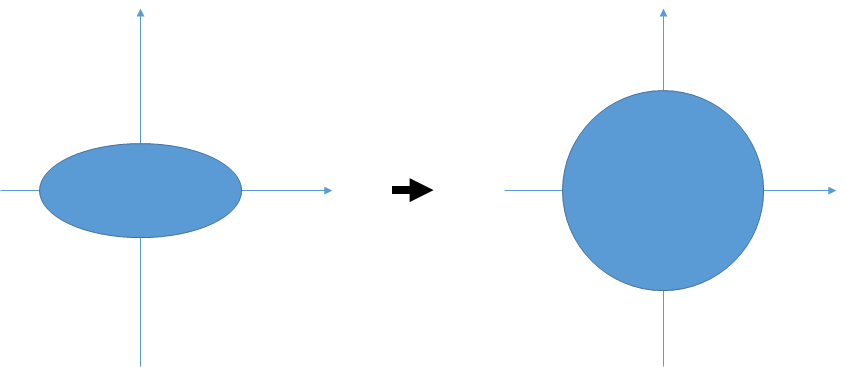
As describe in the figure above, if we select euclidean distance, we don't care about the distribution of sample group and its covariances.

 
In the calculation of Mahalanobis Distance, normalization transform on bases is added just before Euclidean Distance calculation.
\begin{equation} D_{Mahalanobis}(\mathbf{x})=\sqrt[]{(\mathbf{x}-\mathbf{y})^{T}\mathbf{\Sigma}^{-1}(\mathbf{x}-\mathbf{y})} \end{equation}


Let's deep-dive into the $\Sigma^-1$.
We already look over covariance matrix $\Sigma$ in the previous article of PCA.

\begin{eqnarray*} \Sigma & = & \left[\begin{array}{ccc} \sigma_{11}^{2} & \cdots & \sigma_{1D}^{2}\\ \vdots & \ddots & \vdots\\ \sigma_{D1}^{2} & \cdots & \sigma_{DD}^{2} \end{array}\right]\\ & \Downarrow & diagonalization\\ & = & Q\varLambda Q^{T}\\ & = & \left[\begin{array}{cccc} \mathbf{e}_{1} & \mathbf{e}_{2} & \cdots & \mathbf{e}_{D}\end{array}\right]\left[\begin{array}{ccc} \lambda_{1} & \cdots & 0\\ \vdots & \ddots & \vdots\\ 0 & \cdots & \lambda_{D} \end{array}\right]\left[\begin{array}{c} \mathbf{e}_{1}^{T}\\ \mathbf{e}_{2}^{T}\\ \vdots\\ \mathbf{e}_{D}^{T} \end{array}\right] \end{eqnarray*}

$\lambda$s can be replaced with "NEW" variances, $\sigma^2$s.

\begin{eqnarray*} \Sigma & = & Q\varLambda Q^{T}\\ & = & \left[\begin{array}{cccc} \mathbf{e}_{1} & \mathbf{e}_{2} & \cdots & \mathbf{e}_{D}\end{array}\right]\left[\begin{array}{ccc} \sigma_{11}^{2} & \cdots & 0\\ \vdots & \ddots & \vdots\\ 0 & \cdots & \sigma{}_{DD}^{2} \end{array}\right]\left[\begin{array}{c} \mathbf{e}_{1}^{T}\\ \mathbf{e}_{2}^{T}\\ \vdots\\ \mathbf{e}_{D}^{T} \end{array}\right] \end{eqnarray*}
 
The matrix consisting of $\mathbf{e}^T_d$s means transformation to new bases ${\mathbf{e}_d}$.


\begin{eqnarray*} \Sigma^{-1} & = & Q\varLambda^{-1}Q^{T}\\ & = & \left[\begin{array}{cccc} \mathbf{e}_{1} & \mathbf{e}_{2} & \cdots & \mathbf{e}_{D}\end{array}\right]\left[\begin{array}{ccc} \frac{1}{\sigma{}_{11}^{2}} & \cdots & 0\\ \vdots & \ddots & \vdots\\ 0 & \cdots & \frac{1}{\sigma{}_{DD}^{2}} \end{array}\right]\left[\begin{array}{c} \mathbf{e}_{1}^{T}\\ \mathbf{e}_{2}^{T}\\ \vdots\\ \mathbf{e}_{D}^{T} \end{array}\right]\\ & = & \left(\left[\begin{array}{cccc} \mathbf{e}_{1} & \mathbf{e}_{2} & \cdots & \mathbf{e}_{D}\end{array}\right]\left[\begin{array}{ccc} \frac{1}{\sigma{}_{11}} & \cdots & 0\\ \vdots & \ddots & \vdots\\ 0 & \cdots & \frac{1}{\sigma{}_{DD}} \end{array}\right]\right)\left(\left[\begin{array}{ccc} \frac{1}{\sigma{}_{11}} & \cdots & 0\\ \vdots & \ddots & \vdots\\ 0 & \cdots & \frac{1}{\sigma{}_{DD}} \end{array}\right]\left[\begin{array}{c} \mathbf{e}_{1}^{T}\\ \mathbf{e}_{2}^{T}\\ \vdots\\ \mathbf{e}_{D}^{T} \end{array}\right]\right) \end{eqnarray*}

$\frac{1}{\sigma}$ means unit-varaince normalization.


Multivariate Normal Distribution

Multivariate Normal Distribution(MND) is :

\begin{equation} \mathcal{N}_{D}(\mu,\Sigma)=\frac{1}{\sqrt{2\pi^{D}\left|\Sigma\right|}}\exp\left(-\frac{1}{2}(\mathbf{x}-\mu)^{T}\mathbf{\Sigma}^{-1}(\mathbf{x}-\mu)\right) \end{equation}

where $D=\dim\left(\mathbf{x}\right)$.

We can see a term of squared Mahalanobis Distance. $(\mathbf{x}-\mu)^T\Sigma^{-1}(\mathbf{x}-\mu)$ means the squared Mahalanobis Distance from $\mu$. Determinant of $\Sigma$ is a product of variances $\prod_{d}\sigma_d^2$.


QDA (Quadratic Discriminant Analysis)

QDA is more general form of LDA. For QDA We need a important assumption that all classes have a normal distribution (MND).


If we want to discriminate class k and h, we have the following discriminant system.

\begin{equation} \frac{g_{k}(\mathbf{x})}{g_{h}(\mathbf{x})}>T_{k\text{ against }h} \end{equation} \begin{eqnarray*} g_{k}(\mathbf{x}) & = & p(\mathbf{x}|C_{k})p(C_{k})\\ & = & \frac{1}{\sqrt{2\pi^{D}\left|\Sigma_{k}\right|}}\exp\left(-\frac{1}{2}(\mathbf{x}-\mu_{k})^{T}\mathbf{\Sigma}_{k}^{-1}(\mathbf{x}-\mu_{k})\right)p(C_{k}) \end{eqnarray*} \begin{eqnarray*} \frac{g_{k}(\mathbf{x})}{g_{h}(\mathbf{x})} & = & \frac{\frac{1}{\sqrt{2\pi^{D}\left|\Sigma_{k}\right|}}\exp\left(-\frac{1}{2}(\mathbf{x}-\mu_{k})^{T}\mathbf{\Sigma}_{k}^{-1}(\mathbf{x}-\mu_{k})\right)p(C_{k})}{\frac{1}{\sqrt{2\pi^{D}\left|\Sigma_{h}\right|}}\exp\left(-\frac{1}{2}(\mathbf{x}-\mu_{h})^{T}\mathbf{\Sigma}_{h}^{-1}(\mathbf{x}-\mu_{h})\right)p(C_{h})}\\ & = & \frac{\left|\Sigma_{k}\right|^{-\frac{1}{2}}\exp\left(-\frac{1}{2}(\mathbf{x}-\mu_{k})^{T}\mathbf{\Sigma}_{k}^{-1}(\mathbf{x}-\mu_{k})\right)p(C_{k})}{\left|\Sigma_{h}\right|^{-\frac{1}{2}}\exp\left(-\frac{1}{2}(\mathbf{x}-\mu_{h})^{T}\mathbf{\Sigma}_{h}^{-1}(\mathbf{x}-\mu_{h})\right)p(C_{h})} \end{eqnarray*}

It is based on simple Bayesian Decision. Let's refine the formula by using log-scale and the general notation, $\pi_{k}=p(C_{k})$

\begin{eqnarray*} \ln\left(\frac{g_{k}(\mathbf{x})}{g_{h}(\mathbf{x})}\right) & = & -\frac{1}{2}\ln\left|\Sigma_{k}\right|+\left(-\frac{1}{2}(\mathbf{x}-\mu_{k})^{T}\mathbf{\Sigma}_{k}^{-1}(\mathbf{x}-\mu_{k})\right)+\ln\pi_{k}+\frac{1}{2}\ln\left|\Sigma_{h}\right|-\left(-\frac{1}{2}(\mathbf{x}-\mu_{h})^{T}\mathbf{\Sigma}_{h}^{-1}(\mathbf{x}-\mu_{h})\right)-\ln\pi_{h} \end{eqnarray*}

The discriminant function has a quadratic form of vectors. This shows why its name is "Q"DA.


LDA (Linear Discriminant Analysis)

LDA need one more assumption. $\Sigma$s are same.

It looks unrealistics. But here go ahead.

\begin{eqnarray*} \ln\left(\frac{g_{k}(\mathbf{x})}{g_{h}(\mathbf{x})}\right) & = & -\frac{1}{2}\ln\left|\Sigma\right|+\left(-\frac{1}{2}(\mathbf{x}-\mu_{k})^{T}\mathbf{\Sigma}^{-1}(\mathbf{x}-\mu_{k})\right)+\ln\pi_{k}+\frac{1}{2}\ln\left|\Sigma\right|-\left(-\frac{1}{2}(\mathbf{x}-\mu_{h})^{T}\mathbf{\Sigma}^{-1}(\mathbf{x}-\mu_{h})\right)-\ln\pi_{h}\\ & = & \left(-\frac{1}{2}(\mathbf{x}-\mu_{k})^{T}\mathbf{\Sigma}^{-1}(\mathbf{x}-\mu_{k})\right)+\ln\pi_{k}-\left(-\frac{1}{2}(\mathbf{x}-\mu_{h})^{T}\mathbf{\Sigma}^{-1}(\mathbf{x}-\mu_{h})\right)-\ln\pi_{h}\\ & = & -\frac{1}{2}\left(\mathbf{x}^{T}\mathbf{\Sigma}^{-1}\mathbf{x}-2\mu_{k}^{T}\mathbf{\Sigma}^{-1}\mathbf{x}+\mu_{k}^{T}\mathbf{\Sigma}^{-1}\mu_{k}\right)+\frac{1}{2}\left(\mathbf{x}^{T}\mathbf{\Sigma}^{-1}\mathbf{x}-2\mu_{h}^{T}\mathbf{\Sigma}^{-1}\mathbf{x}+\mu_{h}^{T}\mathbf{\Sigma}^{-1}\mu_{h}\right)+\ln\pi_{k}-\ln\pi_{h}\\ & = & -\frac{1}{2}\left(-2\mu_{k}^{T}\mathbf{\Sigma}^{-1}\mathbf{x}+\mu_{k}^{T}\mathbf{\Sigma}^{-1}\mu_{k}\right)+\frac{1}{2}\left(-2\mu_{h}^{T}\mathbf{\Sigma}^{-1}\mathbf{x}+\mu_{h}^{T}\mathbf{\Sigma}^{-1}\mu_{h}\right)+\ln\pi_{k}-\ln\pi_{h}\\ & = & (\mu_{k}-\mu_{h})^{T}\mathbf{\Sigma}^{-1}\mathbf{x}-\frac{1}{2}(\mu_{k}+\mu_{h})^{T}\mathbf{\Sigma}^{-1}(\mu_{h}-\mu_{k})+\ln\pi_{k}-\ln\pi_{h} \end{eqnarray*}

As you see, the discriminant boundary changes from a curve to a straight line (Linear)


Conclusion

Covariance matrix is everywhere. The contents described here are so feasible that most of researchers and developers do not need to check again. But someone who doesn't have concrete mathematical or statistical funcdamentals cannot catch these common pieces and can be confused easily.

Syntax-Highlighter on blogspot

  • Select "Template" in Setting
  • "Edit HTML"

  • Add the following code in <head> </head>


<link href="http://alexgorbatchev.com/pub/sh/current/styles/shCore.css" rel="stylesheet" type="text/css"></link>
<link href="http://alexgorbatchev.com/pub/sh/current/styles/shThemeEmacs.css" rel="stylesheet" type="text/css"></link>
<script src="http://alexgorbatchev.com/pub/sh/current/scripts/shCore.js" type="text/javascript">
 
<script src='http://alexgorbatchev.com/pub/sh/current/scripts/shBrushAS3.js' type='text/javascript'/>
<script src='http://alexgorbatchev.com/pub/sh/current/scripts/shBrushBash.js' type='text/javascript'/>
<script src='http://alexgorbatchev.com/pub/sh/current/scripts/shBrushColdFusion.js' type='text/javascript'/>
<script src='http://alexgorbatchev.com/pub/sh/current/scripts/shBrushCSharp.js' type='text/javascript'/>
<script src='http://alexgorbatchev.com/pub/sh/current/scripts/shBrushCpp.js' type='text/javascript'/>
<script src='http://alexgorbatchev.com/pub/sh/current/scripts/shBrushCss.js' type='text/javascript'/>
<script src='http://alexgorbatchev.com/pub/sh/current/scripts/shBrushDelphi.js' type='text/javascript'/>
<script src='http://alexgorbatchev.com/pub/sh/current/scripts/shBrushDiff.js' type='text/javascript'/>
<script src='http://alexgorbatchev.com/pub/sh/current/scripts/shBrushErlang.js' type='text/javascript'/>
<script src='http://alexgorbatchev.com/pub/sh/current/scripts/shBrushGroovy.js' type='text/javascript'/>
<script src='http://alexgorbatchev.com/pub/sh/current/scripts/shBrushJScript.js' type='text/javascript'/>
<script src='http://alexgorbatchev.com/pub/sh/current/scripts/shBrushJava.js' type='text/javascript'/>
<script src='http://alexgorbatchev.com/pub/sh/current/scripts/shBrushJavaFX.js' type='text/javascript'/>
<script src='http://alexgorbatchev.com/pub/sh/current/scripts/shBrushPerl.js' type='text/javascript'/>
<script src='http://alexgorbatchev.com/pub/sh/current/scripts/shBrushPhp.js' type='text/javascript'/>
<script src='http://alexgorbatchev.com/pub/sh/current/scripts/shBrushPlain.js' type='text/javascript'/>
<script src='http://alexgorbatchev.com/pub/sh/current/scripts/shBrushPowerShell.js' type='text/javascript'/>
<script src='http://alexgorbatchev.com/pub/sh/current/scripts/shBrushPython.js' type='text/javascript'/>
<script src='http://alexgorbatchev.com/pub/sh/current/scripts/shBrushRuby.js' type='text/javascript'/>
<script src='http://alexgorbatchev.com/pub/sh/current/scripts/shBrushScala.js' type='text/javascript'/>
<script src='http://alexgorbatchev.com/pub/sh/current/scripts/shBrushSql.js' type='text/javascript'/>
<script src='http://alexgorbatchev.com/pub/sh/current/scripts/shBrushVb.js' type='text/javascript'/>
<script src='http://alexgorbatchev.com/pub/sh/current/scripts/shBrushXml.js' type='text/javascript'/>
  
<script language='javascript' type='text/javascript'>
 SyntaxHighlighter.config.bloggerMode = true;
 SyntaxHighlighter.all();
</script>
<!-- Syntax Highlighter Additions END -->
  •  Add the following javascript code at the end of every post in HTML mode
<pre class="brush:c;"><code>&lt;script type="text/javascript"&gt;
 SyntaxHighlighter.highlight();
&lt;/script&gt;</code>
</pre>

<script type="text/javascript">
 SyntaxHighlighter.highlight();
</script>

Dimension Reduction using spectral decomposition (0) - PCA


Introduction

I survey most of dimensional reduction methods by using spectral decomposition such as PCA(Principal Component Analysis), LDA(Linear Discriminant Analysis), FLD(Fischer Linear Discriminant), MDA(Multivariate Discriminant Analysis), CCA(Cannonical Correlation Analysis). The following description is in chronological order. Whenever we move to the next methodology, the conditions of problems are more complicated. There are so many articles about these methodology. But I could not found any report that focus on the relationship between methods. I need to know why our predecessors developed these:  from PCA to CCA or other more complicated method. My final goal is setup a unified  table of all methods using same mathematical notation for easier understanding.


Line Fitting on Sample Points

Before we start to discuss PCA, let's review typical line fitting problem ussing sum of squared errors.
All of basic machine learning methods are based on minimzing sum of squared errors.


Let's see a regression line $\mathbf{\mathbf{x}_{0}+}a\mathbf{e}$ (where $\left\Vert \mathbf{e}\right\Vert =1$ ) on the sample $\mathbf{x}_{n}$.

Objective function $f$ to minimize is : \begin{equation} f(\mathbf{x}_{0},\mathbf{e},a_{0},...a_{N})=\sum_{n}^{N}\left\Vert \mathbf{x}_{n}-(\mathbf{x}_{0}+a_{n}\mathbf{e})\right\Vert ^{2} \end{equation} where $\mathbf{x}_{0}+a_{n}\mathbf{e}$ is the closed point to $\mathbf{x}_{n}$ on the regression line.

This sum of squared errors (SSE) is just one among several candidates of cost functions. L1 norm or other norms can be the cost function. If a specific cost function of error is given, we must use it instead of SSE. The reason why most of standard methods use it is easy to handle the formula. SSE is differentiable, so we can analyze its parameters in closed form expressions. (c.f. In logistics regression we should do numerical analysis.)

I will check the relationship between the regression line and $\mu$, mean of $\mathbf{x}_{n}$.

At first, calculate the derivative of $a_{n}$in terms of $\mathbf{x}_{0},\mathbf{x}_{n},\mathbf{e}$. \begin{equation} f(\mathbf{x}_{0},\mathbf{e},a_{0},...a_{N})=\sum_{n}^{N}\left\Vert a_{n}\mathbf{e}+\mathbf{\mathbf{x}}_{0}-\mathbf{x}_{n}\right\Vert ^{2} \end{equation} \begin{eqnarray*} \frac{\partial f}{\partial a_{n}} & = & \frac{\partial\left(\sum_{n}^{N}\left\Vert a_{n}\mathbf{e}+\mathbf{\mathbf{x}}_{0}-\mathbf{x}_{n}\right\Vert ^{2}\right)}{\partial a_{n}}=\frac{\partial\left(\left\Vert a_{n}\mathbf{e}+\mathbf{\mathbf{x}}_{0}-\mathbf{x}_{n}\right\Vert ^{2}\right)}{\partial a_{n}}\\ & = & \frac{\partial\left(a_{n}^{2}\left\Vert \mathbf{e}\right\Vert ^{2}+2a_{n}\mathbf{e}^{T}(\mathbf{\mathbf{x}}_{0}-\mathbf{x}_{n})+\left\Vert \mathbf{\mathbf{x}}_{0}-\mathbf{x}_{n}\right\Vert ^{2}\right)}{\partial a_{n}}\\ & = & 2a_{n}+2\mathbf{e}^{T}(\mathbf{\mathbf{x}}_{0}-\mathbf{x}_{n}) \end{eqnarray*}

We can get $\underset{a_{n}}{\arg\min}(f)$ by ${\displaystyle \frac{\partial f}{\partial a_{n}}=0}$. \begin{equation} a_{n}=\mathbf{e}^{T}(\mathbf{\mathbf{x}}_{n}-\mathbf{x}_{0}) \end{equation}

This means that projection of $(\mathbf{\mathbf{x}}_{n}-\mathbf{x}_{0})$ on $\mathbf{e}$. Actually most of books skip this proof, since it is a basic linear algebra.

Now analyze $f$ with respect to $\mathbf{x}_{0}$.

In expanding $f$ I use $a_{n}$ instead of $\mathbf{e}^{T}(\mathbf{\mathbf{x}}_{n}-\mathbf{x}_{0})$ for a moment. It is just for easier calculation. \begin{eqnarray*} f(\mathbf{x}_{0},\mathbf{e}) & = & \sum_{n}^{N}\left\Vert \mathbf{x}_{0}-\mathbf{x}_{n}+a_{n}\mathbf{e}\right\Vert ^{2}\\ & = & \sum_{n}^{N}\left(\left\Vert \mathbf{x}_{0}-\mathbf{x}_{n}\right\Vert ^{2}+2(a_{n}\mathbf{e})^{T}(\mathbf{x}_{0}-\mathbf{x}_{n})+\left\Vert a_{n}\mathbf{e}\right\Vert ^{2}\right)\\ & = & \sum_{n}^{N}\left\Vert \mathbf{x}_{0}-\mathbf{x}_{n}\right\Vert ^{2}+2\sum_{n}^{N}a_{n}\overbrace{\left(\mathbf{e}{}^{T}(\mathbf{x}_{0}-\mathbf{x}_{n})\right)}^{=-a_{n}}+\sum_{n}^{N}a_{n}^{2}\overbrace{\left\Vert \mathbf{e}\right\Vert ^{2}}^{=1}\\ & = & \sum_{n}^{N}\left\Vert \mathbf{x}_{0}\right\Vert ^{2}-2\sum_{n}^{N}\mathbf{x}_{n}^{T}\mathbf{x}_{0}+\sum_{n}^{N}\left\Vert \mathbf{x}_{n}\right\Vert ^{2}-2\sum_{n}^{N}a_{n}(a_{n})+\sum_{n}^{N}a_{n}^{2}\\ & = & \sum_{n}^{N}\left\Vert \mathbf{x}_{0}\right\Vert ^{2}-2\sum_{n}^{N}\mathbf{x}_{n}^{T}\mathbf{x}_{0}+\sum_{n}^{N}\left\Vert \mathbf{x}_{n}\right\Vert ^{2}-\sum_{n}^{N}a_{n}^{2}\\ & = & \sum_{n}^{N}\left\Vert \mathbf{x}_{0}\right\Vert ^{2}-2\sum_{n}^{N}\mathbf{x}_{n}^{T}\mathbf{x}_{0}+\sum_{n}^{N}\left\Vert \mathbf{x}_{n}\right\Vert ^{2}-\sum_{n}^{N}(\mathbf{x}_{0}-\mathbf{x}_{n})^{T}\mathbf{e}\mathbf{e}^{T}(\mathbf{x}_{0}-\mathbf{x}_{n})\\ & = & N\left\Vert \mathbf{x}_{0}\right\Vert ^{2}-2\sum_{n}^{N}\mathbf{x}_{n}^{T}\mathbf{x}_{0}+\sum_{n}^{N}\left\Vert \mathbf{x}_{n}\right\Vert ^{2}-\sum_{n}^{N}\left(\mathbf{x}_{0}^{T}\mathbf{e}\mathbf{e}^{T}\mathbf{x}_{0}-2\mathbf{x}_{n}^{T}\mathbf{e}\mathbf{e}^{T}\mathbf{x}_{0}+\mathbf{x}_{n}^{T}\mathbf{e}\mathbf{e}^{T}\mathbf{x}_{n}\right)\\ & = & N\left\Vert \mathbf{x}_{0}\right\Vert ^{2}-\sum_{n}^{N}\mathbf{x}_{0}^{T}\mathbf{e}\mathbf{e}^{T}\mathbf{x}_{0}-2\sum_{n}^{N}\mathbf{x}_{n}^{T}\mathbf{x}_{0}+2\sum_{n}^{N}\mathbf{x}_{n}^{T}\mathbf{e}\mathbf{e}^{T}\mathbf{x}_{0}+\sum_{n}^{N}\left\Vert \mathbf{x}_{n}\right\Vert ^{2}-\sum_{n}^{N}\mathbf{x}_{n}^{T}\mathbf{e}\mathbf{e}^{T}\mathbf{x}_{n} \end{eqnarray*} Similarly to the case of $a_{n}$, set ${\displaystyle \frac{\partial f}{\partial\mathbf{x}_{0}}=0}$ \begin{equation} \frac{\partial f(\mathbf{x}_{0},\mathbf{e})}{\partial\mathbf{x}_{0}}=2N\mathbf{\mathbf{x}_{0}}-2N\mathbf{e}\mathbf{e}^{T}\mathbf{x}_{0}-2\sum_{n}^{N}\mathbf{x}_{n}+2\mathbf{e}\mathbf{e}^{T}\sum_{n}^{N}\mathbf{x}_{n} \end{equation} We don't need to build a closed form of $\mathbf{x}_{0}$. Just consider it in this implicit form. \begin{eqnarray*} \frac{\partial f(\mathbf{x}_{0},\mathbf{e})}{\partial\mathbf{x}_{0}} & = & 0\\ & = & 2N\mathbf{\mathbf{x}_{0}}-2N\mathbf{e}\mathbf{e}^{T}\mathbf{x}_{0}-2\sum_{n}^{N}\mathbf{x}_{n}+2\mathbf{e}\mathbf{e}^{T}\sum_{n}^{N}\mathbf{x}_{n}\\ & = & 2N\mathbf{\mathbf{x}_{0}}-2\sum_{n}^{N}\mathbf{x}_{n}+2\mathbf{e}\mathbf{e}^{T}\sum_{n}^{N}(\mathbf{x}_{n}-\mathbf{x}_{0})\\ & = & 2N\mathbf{\mathbf{x}_{0}}-2\sum_{n}^{N}\mathbf{x}_{n}+2\mathbf{e}\sum_{n}^{N}a_{n} \end{eqnarray*} \begin{equation} \frac{\partial f}{\partial\mathbf{x}_{0}}=0\Longleftrightarrow\frac{1}{N}\sum_{n}^{N}\mathbf{x}_{n}=\mu=\mathbf{x}_{0}+\mathbf{e}\left(\frac{1}{N}\sum_{n}^{N}a_{n}\right) \end{equation} The meaning of Eq.(5) is that the mean should be on the regression line $\mathbf{x}_{0}+a\mathbf{e}$. It is reasonable intuitively.


This explanation for Line Fitting is not general. It is for easier descripition of the relationship between PCA and Regression.


PCA(Principal Component Analysis)

I will explain PCA as a expansion of Line Fitting. 
The strategy of PCA is :

Analyze covariances of sample vectors and extract a new set of bases that represents samples more "Discriminable". Finally set up smaller size of new basis set by ignoring less discriminative bases. Why these type of processes are called as "Dimension Reduction" is that the size of new bases is smaller than original dimensions.

And "Discriminability" means larger variances.
See the following figure. After getting new basis vectors $\mathbf{e}_1$, $\mathbf{e}_2$, just ignore $\mathbf{e}_2$. Now sample data can be represented values projected on $\mathbf{e}_1$. This process reduces 2D to 1D

It is reasonable that basis $\mathbf{e}_1$ is more discriminative than $\mathbf{e}_2$ since $\mathbf{e}_1$ maximizes new variance, the variance of projected values on it.
$\mathbf{e}_2$ is also the largest basis representing the subspace orthogonal to $\mathbf{e}_1$. In reduction problems from 3D to 2D, $\mathbf{e}_2$ can be a member of new bases.

These new elements of new vectors, $a$s after projection on new bases is called as "Principal Components".


Now I will explain fundamentals of PCA step by step.
The following mathematical discription is based on the famous text book, "Richard O. Duda et al., Pattern Classification 2nd Ed.".

Let's think about only one new basis vector for samples. It is exactly same as Line Fitting explained in the previous section.
Rearrange the main formula of the previous section in terms of $e$ by setting $\mathbf{x}_0=\mu$. I will explain why $\mathbf{x}_0=\mu$ is fisible by using the previous analysis. In this step just assume that $\mu$ is the best representative value of samples' distribution.

\begin{eqnarray*} f(\mathbf{e}) & = & \sum_{n}^{N}\left\Vert a_{n}\mathbf{e}-(\mathbf{x}_{n}-\mu)\right\Vert ^{2}\\ & = & \sum_{n}^{N}\left(\left\Vert a_{n}\mathbf{e}\right\Vert ^{2}-2a_{n}\mathbf{e}^{T}(\mathbf{x}_{n}-\mu)+\left\Vert \mathbf{x}_{n}-\mu\right\Vert ^{2}\right)\\ & = & \sum_{n}^{N}\left(a_{n}^{2}-2a_{n}^{2}+\left\Vert \mathbf{x}_{n}-\mu\right\Vert ^{2}\right)\\ & = & \sum_{n}^{N}\left(-a_{n}^{2}+\left\Vert \mathbf{x}_{n}-\mu\right\Vert ^{2}\right)\\ & = & -\sum_{n}^{N}a_{n}^{2}+\sum_{n}^{N}\left\Vert \mathbf{x}_{n}-\mu\right\Vert ^{2}\\ & = & -\sum_{n}^{N}\mathbf{e}^{T}(\mathbf{x}_{n}-\mu)(\mathbf{x}_{n}-\mu)^{T}\mathbf{e}+\sum_{n}^{N}\left\Vert \mathbf{x}_{n}-\mu\right\Vert ^{2}\\ & = & -N\mathbf{e}^{T}\mathbf{\Sigma}\mathbf{e}+\sum_{n}^{N}\left\Vert \mathbf{x}_{n}-\mu\right\Vert ^{2} \end{eqnarray*}

where $\Sigma$ is covariance matrix.

To minimize $f$, constraint $\left\Vert \mathbf{e}\right\Vert =1$ should be considered. $f$ is transformed to Lagrangian formula $L$ with a Lagrangian multiplier$\lambda$.

\begin{equation} L(\mathbf{e},\lambda)=-N\mathbf{e}^{T}\mathbf{\Sigma}\mathbf{e}+\sum_{n}^{N}\left\Vert \mathbf{x}_{n}-\mu\right\Vert ^{2}+\lambda(\mathbf{e}^{T}\mathbf{e}-1) \end{equation} \begin{equation} \frac{\partial L(\mathbf{e},\lambda)}{\partial\mathbf{e}}=-2N\mathbf{\Sigma}\mathbf{e}+2\lambda\mathbf{e}=0\Longleftrightarrow N\mathbf{\Sigma}\mathbf{e}=\lambda\mathbf{e} \end{equation}

This is a typical eigen problem and $(\mathbf{e},\lambda)$ is (eigenvector, eigenvalue). 

We can get the following analysis :

1. $\mathbf{rank}$ of covariance matrix means numbers of possible eigenvectors.
2. Since $\sum_{n}^{N}a_{n}^{2}$ is N times of variance of $a_{n}$s and $\sum_{n}^{N}a_{n}^{2} = N\mathbf{e}^{T}\mathbf{\Sigma}\mathbf{e}= \mathbf{e}^{T}\lambda\mathbf{e}=\lambda$, a larger $\lambda$ means a larger variance.
3. Since $f = -N\mathbf{e}^{T}\mathbf{\Sigma}\mathbf{e}+ ...= -\mathbf{e}^{T}\lambda\mathbf{e}=\lambda$,  $\mathbf{e}$ with the largest eigenvalue means a input value of global miminum. Others are local maximums.

Let's expand these analyses to the case of multiple basis vectors,
\begin{eqnarray*} f(\mathbf{e}_{0,}\mathbf{e}_{1},...,\mathbf{e}_{D}) & = & \sum_{n}^{N}\left\Vert \sum_{d}^{D}a_{n,d}\mathbf{e}_{d}-(\mathbf{x}_{n}-\mu)\right\Vert ^{2}\\ & = & \sum_{n}^{N}\left(\left(\sum_{d}^{D}a_{n,d}\mathbf{e}_{d}\right)^{2}-2\sum_{d}^{D}a_{n,d}\mathbf{e}_{d}^{T}(\mathbf{x}_{n}-\mu)+\left\Vert \mathbf{x}_{n}-\mu\right\Vert ^{2}\right)\\ & = & \sum_{n}^{N}\left(\sum_{d}^{D}a_{n,d}^{2}+2\sum_{d\neq d'}^{D}a_{n,d}a_{n,d'}\underbrace{\mathbf{e}_{d}\mathbf{e}_{d'}}_{=0}-2\sum_{d}^{D}a_{n,d}\mathbf{e}_{d}^{T}(\mathbf{x}_{n}-\mu)+\left\Vert \mathbf{x}_{n}-\mu\right\Vert ^{2}\right)\\ & = & \sum_{n}^{N}\left(\sum_{d}^{D}\left(a_{n,d}^{2}-2a_{n,d}^{2}\right)+\left\Vert \mathbf{x}_{n}-\mu\right\Vert ^{2}\right)\\ & = & \sum_{n}^{N}\left(-\sum_{d}^{D}a_{n,d}^{2}+\left\Vert \mathbf{x}_{n}-\mu\right\Vert ^{2}\right)\\ & = & -N\sum_{d}^{D}\mathbf{e}_{d}^{T}\mathbf{\Sigma}\mathbf{e}_{d}+\sum_{n}^{N}\left\Vert \mathbf{x}_{n}-\mu\right\Vert ^{2} \end{eqnarray*}
where $D\leqq\mathbf{dim}(\mathbf{x}_n)$.
The process getting individual basis vectors is same as the previous process.

\begin{equation} \frac{\partial L(\mathbf{e}_{d},\lambda)}{\partial\mathbf{e}_{d}}=-2N\mathbf{\Sigma}\mathbf{e}_{d}+2\lambda\mathbf{e}_{d}=0\Longleftrightarrow N\mathbf{\Sigma}\mathbf{e}_{d}=\lambda\mathbf{e}_{d} \end{equation}

Since eigenvectors are orthogonal the eigenvectors of $N\mathbf{\Sigma}$ means new basis vectors for PCA.

As mentioned before. Larger $\lambda$ makes $f$ smaller. So we choose $D$ eigenvectors in order of size of $\lambda$ from large.


Let's go back to why $\mathbf{x}_0$ should be $\mu$. As I explained in the previous section, $\mu$ is on the line $\mathbf{e}_0$ (the largest basis). All of $\mathbf{e}_d$ have same formula.

\begin{equation} \mu=\mathbf{x}_{0}+\frac{1}{N}\sum_{n}^{N}a_{n,d}\mathbf{e}_{d} \end{equation}
$\mu$ should be on all of lines of $\mathbf{e}_d$. If $D>1$, $\mathbf{x}_0$ should be only one, $\mu$.


Sunday, August 31, 2014

Testing MathJax


When $a \ne 0$, there are two solutions to \(ax^2 + bx + c = 0\) and they are $$x = {-b \pm \sqrt{b^2-4ac} \over 2a}.$$

Friday, June 06, 2014

[Links] Computer Vision Links & References

Information for Deep Learning

Mathematical Fundamental

Computer Vision, Model, Learning and Inference

Recognizing and Learning Object Categories

David Forsyth's Homepage

Derek Hoiem

 Robert T. Collins

Technische Universitat Munchen

Computer Vision Online

Advanced Robotics Lecture Notes@UC Berkeley 

Monday, March 24, 2014

OpenCL on Ubuntu 12.04 + Intel CPU


Reference


Install

Install OpenCL Driver & related files (intel_sdk_for_ocl_applications_2014_beta_sdk_4.0.1.17537_x64.tgz) downloaded from http://software.intel.com/en-us/vcsource/tools/opencl-sdk-beta. 


Before installing the packages, debian package manager said that we need to install libnuma1.

./intel_sdk_for_ocl_applications_2014_beta_sdk_4.0.1.17537_x64
├── EULA.txt
├── install-cpu.sh
├── opencl-1.2-base-4.0.1.17537-1.x86_64.deb
├── opencl-1.2-devel-4.0.1.17537-1.x86_64.deb
├── opencl-1.2-intel-cpu-4.0.1.17537-1.x86_64.deb
├── opencl-1.2-intel-devel-4.0.1.17537-1.x86_64.deb
├── opencl-1.2-intel-devel-android-4.0.1.17537-1.x86_64.deb
└── uninstall.sh

Why OpenCL(libOpenCL.so) needs NUMA(libnuma)? libnuma1 is pre-required package of opencl-1.2-base-4.0.1.17537-1.x86_64.deb. You can check by "dpkg-dev --control opencl-1.2-base-4.0.1.17537-1.x86_64.deb ." and "vim control".

Package: opencl-base
Version: 1.2-4.0.1.17537
Depends: bash, dpkg, libnuma1
Section: extras
Maintainer: Intel Corporation
Architecture: all
Priority: optional
Description: OpenCL* (Open Computing Language) is an open standard for general-purpose
  parallel programming. OpenCL* provides a uniform programming environment for software
  developers to write portable code for client computer systems, high-performance computing
  servers, and other compute systems. This package contains OpenCL installable client driver
  loader. The OpenCL* installable client driver (ICD) enables different OpenCL* implementations
  to coexist on the same system. ICD also  enables applications to select between OpenCL*
  implementations at run time.

$ dpkg-deb -x ./opencl-1.2-base-4.0.1.17537-1.x86_64.deb .
$ tree
...
├── opt
│   └── intel
│       └── opencl-1.2-4.0.1.17537
│           └── lib64
│               ├── libOpenCL.so -> libOpenCL.so.1
│               ├── libOpenCL.so.1 -> libOpenCL.so.1.2
│               └── libOpenCL.so.1.2


$ ls -al /usr/lib/x86_64-linux-gnu/libOpenCL.so
lrwxrwxrwx 1 root root 37 Mar 22 23:10 /usr/lib/x86_64-linux-gnu/libOpenCL.so -> /etc/alternatives/opencl-libOpenCL.so

$ ls -al /etc/alternatives/opencl-libOpenCL.so
lrwxrwxrwx 1 root root 52 Mar 22 23:10 /etc/alternatives/opencl-libOpenCL.so -> /opt/intel/opencl-1.2-4.0.1.17537/lib64/libOpenCL.so


Querying Profile by using OpenCL Query functions

My laptop is MSI GE60 with Intel Core i7 4800MQ, whose spec is : http://ark.intel.com/products/75128/Intel-Core-i7-4800MQ-Processor-6M-Cache-up-to-3_70-GHz
Unfortunately we cannot use  CL_DEVICE_TYPE_GPU YET (2014-03-23)

The following is the result of my own tiny sample (https://github.com/stereoboy/opencl_samples).
num of platform ids: 1
-<0>------------------- Platform ID[0xa79f60]
CL_PLATFORM_PROFILE = FULL_PROFILE
CL_PLATFORM_VERSION = OpenCL 1.2 LINUX
CL_PLATFORM_NAME = Intel(R) OpenCL
CL_PLATFORM_VENDOR = Intel(R) Corporation
CL_PLATFORM_EXTENSIONS = cl_khr_icd cl_khr_global_int32_base_atomics cl_khr_global_int32_extended_atomics cl_khr_local_int32_base_atomics cl_khr_local_int32_extended_atomics cl_khr_byte_addressable_store cl_khr_spir cl_intel_exec_by_local_thread cl_khr_depth_images cl_khr_3d_image_writes cl_khr_fp64
num of device ids: 1
-<0>------------------- Device ID[0xa7abc8]
CL_DEVICE_NAME = Intel(R) Core(TM) i7-4800MQ CPU @ 2.70GHz
CL_DEVICE_TYPE = 2
CL_DEVICE_VENDOR = Intel(R) Corporation
CL_DEVICE_VERSION = OpenCL 1.2 (Build 83073)
CL_DEVICE_MAX_COMPUTE_UNITS = 8
CL_DEVICE_GLOBAL_MEM_SIZE = 0

Intel OpenCL does not support Ubuntu 12.04 + Intel GPU. Look at the "Supported Hardware" list in the release notes (http://software.intel.com/en-us/articles/intel-sdk-for-opencl-applications-2014-beta-release-notes)

Running OpenCL on NVidia Optimus (uncompleted)

https://wiki.ubuntu.com/Bumblebee

Thursday, December 12, 2013

Analyzing the simplest Wayland Clinet test

Wayland is a replacement of X System.
This document is based on current Wayland 1.3 documentation & its source code.


The simplest testcase is weston-simple-touch. This source code
is http://cgit.freedesktop.org/wayland/weston/tree/clients/simple-touch.c

Analysis on Client code only

Main function is very simple. Setup by calling touch_create(). and looping by wl_display_dispatch().


int
main(int argc, char **argv)
{
 struct touch *touch;
 int ret = 0;

 touch = touch_create(600, 500);

 while (ret != -1)
  ret = wl_display_dispatch(touch->display);

 return 0;
}

Initialization & Structures

At first we set up wl_display & wl_registry.

display
 - display context. Similar concept of XDisplay in X System.

registry
 - generated from display. global registry object : bind an object to the display

static struct touch *
touch_create(int width, int height)
{
 struct touch *touch;

 touch = malloc(sizeof *touch);
 if (touch == NULL) {
  fprintf(stderr, "out of memory\n");
  exit(1);
 }
 touch->display = wl_display_connect(NULL);
 assert(touch->display);

 touch->has_argb = 0;
 touch->registry = wl_display_get_registry(touch->display);
 wl_registry_add_listener(touch->registry, &registry_listener, touch);
 wl_display_dispatch(touch->display);
 wl_display_roundtrip(touch->display);

 if (!touch->has_argb) {
  fprintf(stderr, "WL_SHM_FORMAT_ARGB32 not available\n");
  exit(1);
 }
...

Objects which can be bound to registry are:

  • wl_compositor
  • wl_subcompositor
  • screenshooter
  • text_cursor_position
  • wl_text_input_manager
  • wl_shm
  • wl_output
  • wl_drm
  • wl_seat
  • wl_input_method
  • wl_shell
  • desktop_shell
  • screensaver
  • wl_input_panel
  • workspace_manager
  • ...
Some ones have wl_ prefix, others don't. But I do not know why exactly yet. I suppose wl_ mean wayland spec, and no prefix means supplemental add on.

And we can extract more specific objects from registry-bound objects.

In this example, we use the following objects only.

wl_compositor
        -> wl_surface       //<- surface

wl_shell
        -> wl_shell_surface

wl_shm
        -> wl_shm_pool
                -> wl_buffer    //<- graphics buffer for surface

wl_seat
        -> wl_touch            //<- touch


static void
handle_global(void *data, struct wl_registry *registry,
       uint32_t name, const char *interface, uint32_t version)
{
 struct touch *touch = data;

 if (strcmp(interface, "wl_compositor") == 0) {
  touch->compositor =
   wl_registry_bind(registry, name,
      &wl_compositor_interface, 1);
 } else if (strcmp(interface, "wl_shell") == 0) {
  touch->shell =
   wl_registry_bind(registry, name,
      &wl_shell_interface, 1);
 } else if (strcmp(interface, "wl_shm") == 0) {
  touch->shm = wl_registry_bind(registry, name,
           &wl_shm_interface, 1);
  wl_shm_add_listener(touch->shm, &shm_listener, touch);
 } else if (strcmp(interface, "wl_seat") == 0) {
  touch->seat = wl_registry_bind(registry, name,
            &wl_seat_interface, 1);
  wl_seat_add_listener(touch->seat, &seat_listener, touch);
 }
}

Touch object

To get wl_touch, add touch listener on wl_seat(http://fossies.org/dox/wayland-1.3.0/structwl__seat__interface.html). wl_seat is group of input devices.
static void
seat_handle_capabilities(void *data, struct wl_seat *seat,
    enum wl_seat_capability caps)
{
 struct touch *touch = data;

 if ((caps & WL_SEAT_CAPABILITY_TOUCH) && !touch->wl_touch) {
  touch->wl_touch = wl_seat_get_touch(seat);
  wl_touch_set_user_data(touch->wl_touch, touch);
  wl_touch_add_listener(touch->wl_touch, &touch_listener, touch);
 } else if (!(caps & WL_SEAT_CAPABILITY_TOUCH) && touch->wl_touch) {
  wl_touch_destroy(touch->wl_touch);
  touch->wl_touch = NULL;
 }
}

static const struct wl_seat_listener seat_listener = {
 seat_handle_capabilities,
};

After getting wl_touch in wl_seat_listener, finally we can control touch event using wl_touch, wl_touch_listener. It is so a long way.

touch_down()/up()/move() seem clear. But I don't understand touch_handle_frame()/cancel() yet.

touch_paint() is just a drawing function that contains surface update routine such as wl_surface_attach(), wl_surface_damage(), wl_surface_commit(). touch->data is user memory address, which is explained in the next section.


static void
touch_paint(struct touch *touch, int32_t x, int32_t y, int32_t id)
{
 uint32_t *p, c;
 static const uint32_t colors[] = {
  0xffff0000,
  0xffffff00,
  0xff0000ff,
  0xffff00ff,
  0xff00ff00,
  0xff00ffff,
 };

 if (id < (int32_t) ARRAY_LENGTH(colors))
  c = colors[id];
 else
  c = 0xffffffff;

 if (x < 2 || x >= touch->width - 2 ||
     y < 2 || y >= touch->height - 2)
  return;

 p = (uint32_t *) touch->data + (x - 2) + (y - 2) * touch->width;
 p[2] = c;
 p += touch->width;
 p[1] = c;
 p[2] = c;
 p[3] = c;
 p += touch->width;
 p[0] = c;
 p[1] = c;
 p[2] = c;
 p[3] = c;
 p[4] = c;
 p += touch->width;
 p[1] = c;
 p[2] = c;
 p[3] = c;
 p += touch->width;
 p[2] = c;

 wl_surface_attach(touch->surface, touch->buffer, 0, 0);
 wl_surface_damage(touch->surface, x - 2, y - 2, 5, 5);
 /* todo: We could queue up more damage before committing, if there
  * are more input events to handle.
  */
 wl_surface_commit(touch->surface);
}

static void
touch_handle_down(void *data, struct wl_touch *wl_touch,
    uint32_t serial, uint32_t time, struct wl_surface *surface,
    int32_t id, wl_fixed_t x_w, wl_fixed_t y_w)
{
 struct touch *touch = data;
 float x = wl_fixed_to_double(x_w);
 float y = wl_fixed_to_double(y_w);

 touch_paint(touch, x, y, id);
}

static void
touch_handle_up(void *data, struct wl_touch *wl_touch,
  uint32_t serial, uint32_t time, int32_t id)
{
}

static void
touch_handle_motion(void *data, struct wl_touch *wl_touch,
      uint32_t time, int32_t id, wl_fixed_t x_w, wl_fixed_t y_w)
{
 struct touch *touch = data;
 float x = wl_fixed_to_double(x_w);
 float y = wl_fixed_to_double(y_w);

 touch_paint(touch, x, y, id);
}

static void
touch_handle_frame(void *data, struct wl_touch *wl_touch)
{
}

static void
touch_handle_cancel(void *data, struct wl_touch *wl_touch)
{
}

static const struct wl_touch_listener touch_listener = {
 touch_handle_down,
 touch_handle_up,
 touch_handle_motion,
 touch_handle_frame,
 touch_handle_cancel,
};

Surface & Graphics buffer object

The following code is the rest of the touch_create() function, which set up the wl_surface, wl_shell_surface and attach a graphics buffer on wl_surface.

At first, we create wl_surface, and wl_buffer, which is pointing real memory array. And then just link this two objects by wl_surface_attach(). Finally we create damage and commit all state.

static struct touch *

 touch->width = width;
 touch->height = height;
 touch->surface = wl_compositor_create_surface(touch->compositor);
 touch->shell_surface = wl_shell_get_shell_surface(touch->shell,
         touch->surface);
 create_shm_buffer(touch);

 if (touch->shell_surface) {
  wl_shell_surface_add_listener(touch->shell_surface,
           &shell_surface_listener, touch);
  wl_shell_surface_set_toplevel(touch->shell_surface);
 }

 wl_surface_set_user_data(touch->surface, touch);
 wl_shell_surface_set_title(touch->shell_surface, "simple-touch");

 memset(touch->data, 64, width * height * 4);
 wl_surface_attach(touch->surface, touch->buffer, 0, 0);
 wl_surface_damage(touch->surface, 0, 0, width, height);
 wl_surface_commit(touch->surface);

 return touch;
}
At first we create a file with input size, and then extract user address by mmap. This user address is for direct-pixel manipulating in touch_paint(). And we need to wl_buffer which is interpreted by Wayland system. wl_shm_pool means a memory chunk. wl_buffer represents more specific graphics buffer with width, height, stride, pixel format. I was confused with close(fd) right after creating wl_buffer ( call wl_shm_pool_create_buffer() ), but APUE 3rd edition said
... Closing the file descriptor used when we mapped the region does not unmap the region. ...
And other web page also said (http://pubs.opengroup.org/onlinepubs/009695399/functions/mmap.html)
The mmap() function shall add an extra reference to the file associated with the file descriptor fildes which is not removed by a subsequent close() on that file descriptor. This reference shall be removed when there are no more mappings to the file.

shm_format() callback function in wl_shm_listener is just for checking whether the format of ARGB8888 is available or not on compositor.

static void
create_shm_buffer(struct touch *touch)
{
 struct wl_shm_pool *pool;
 int fd, size, stride;

 stride = touch->width * 4;
 size = stride * touch->height;

 fd = os_create_anonymous_file(size);
 if (fd < 0) {
  fprintf(stderr, "creating a buffer file for %d B failed: %m\n",
   size);
  exit(1);
 }

 touch->data =
  mmap(NULL, size, PROT_READ | PROT_WRITE, MAP_SHARED, fd, 0);
 if (touch->data == MAP_FAILED) {
  fprintf(stderr, "mmap failed: %m\n");
  close(fd);
  exit(1);
 }

 pool = wl_shm_create_pool(touch->shm, fd, size);
 touch->buffer =
  wl_shm_pool_create_buffer(pool, 0,
       touch->width, touch->height, stride,
       WL_SHM_FORMAT_ARGB8888);
 wl_shm_pool_destroy(pool);

 close(fd);
}

static void
shm_format(void *data, struct wl_shm *wl_shm, uint32_t format)
{
 struct touch *touch = data;

 if (format == WL_SHM_FORMAT_ARGB8888)
  touch->has_argb = 1;
}

struct wl_shm_listener shm_listener = {
 shm_format
};

Interaction with the server (weston)

One of the important information shared between client & server is fd (file descriptor). Wayland uses domain-socket IPC to transfer it. I do not dive deep inside. Reference is source code of "Sending a file descriptor over a UNIX domain socket" in APUE 3rd Edition

Here I just check the interaction point: which functions or call-stacks perform that IPC.
In the client, wl_display_dispatch() and other "dispatch" functions such as wl_display_roundtrip().

<send>
sendmsg ()
wl_connection_flush () at connection.c:286
wl_display_dispatch_queue () at wayland-client.c:1201
wl_display_dispatch () at wayland-client.c:1290
<receive>
recvmsg ()
wl_os_recvmsg_cloexec () at wayland-os.c:123
wl_connection_read () at connection.c:327
read_events () at wayland-client.c:964
wl_display_dispatch_queue () at wayland-client.c:1220
wl_display_dispatch () at wayland-client.c:1290

In the server(weston compositor)

<send>
sendmsg ()
wl_connection_flush () at connection.c:286
wl_display_flush_clients () at wayland-server.c:880
wl_display_run () at wayland-server.c:868
main () at compositor.c:3377
<receive>
recvmsg ()
wl_os_recvmsg_cloexec () at wayland-os.c:123
wl_connection_read () at connection.c:327
wl_client_connection_data () at wayland-server.c:261
wl_event_source_fd_dispatch () at event-loop.c:86
wl_event_loop_dispatch () at event-loop.c:421
wl_display_run () at wayland-server.c:869
main () at compositor.c:3377

Now go to the source code. There is a pattern in Wayland code.


  • If wl_OBJ_FUNC() exists in the client, there is OBJ_FUNC() in the server.
  • if wl_OBJ_listener and its callback FUNC() exists, there is wl_OBJ_send_FUNC() in the server.


  • Clients' wl_OBJ_FUNC()s and a server's wl_OJB_send_FUNC()s just post the event/request on it's queue, not do IPC directly. IPC happens when calling wl_display_dispatch() in the clients and calling wl_connection_flush()/read() in the server.

    Touch object

    If the client calls wl_display_registry(), server will receive the message and run display_registry()

    wayland/src/wayland-server.c
    display_get_registry(struct wl_client *client,
           struct wl_resource *resource, uint32_t id)
    {
     struct wl_display *display = resource->data;
     struct wl_resource *registry_resource;
     struct wl_global *global;
    
     registry_resource =
      wl_resource_create(client, &wl_registry_interface, 1, id);
     if (registry_resource == NULL) {
      wl_client_post_no_memory(client);
      return;
     }
    
     wl_resource_set_implementation(registry_resource,
               &registry_interface,
               display, unbind_resource);
    
     wl_list_insert(&display->registry_resource_list,
             &registry_resource->link);
    
     wl_list_for_each(global, &display->global_list, link)
      wl_resource_post_event(registry_resource,
               WL_REGISTRY_GLOBAL,
               global->name,
               global->interface->name,
               global->version);
    }
    
    If call wl_registry_bind(registry, name/*seat_name*/, &wl_seat_interface, 1), registry_bind() -> bind_seat() is called in the server. And this function set up seat_get_touch() as get_touch() callback. In line 1481, wl_seat_send_capabilities() wake-up client wl_seat_listener's callback capabilities( seat_handle_capabilities() in this example).

    wayland/src/wayland-server.c
    static const struct wl_seat_interface seat_interface = {
     seat_get_pointer,
     seat_get_keyboard,
     seat_get_touch,
    };
    
    static void
    bind_seat(struct wl_client *client, void *data, uint32_t version, uint32_t id)
    {
     struct weston_seat *seat = data;
     struct wl_resource *resource;
     enum wl_seat_capability caps = 0;
    
     resource = wl_resource_create(client,
              &wl_seat_interface, MIN(version, 3), id);
     wl_list_insert(&seat->base_resource_list, wl_resource_get_link(resource));
     wl_resource_set_implementation(resource, &seat_interface, data,
               unbind_resource);
    
     if (seat->pointer)
      caps |= WL_SEAT_CAPABILITY_POINTER;
     if (seat->keyboard)
      caps |= WL_SEAT_CAPABILITY_KEYBOARD;
     if (seat->touch)
      caps |= WL_SEAT_CAPABILITY_TOUCH;
    
     wl_seat_send_capabilities(resource, caps);
     if (version >= 2)
      wl_seat_send_name(resource, seat->seat_name);
    }
    
    And then in seat_handle_capabilities(), we call wl_seat_get_touch(seat), seat_get_touch() is called.

    wayland/src/wayland-server.c
    static void
    seat_get_touch(struct wl_client *client, struct wl_resource *resource,
            uint32_t id)
    {
     struct weston_seat *seat = wl_resource_get_user_data(resource);
     struct wl_resource *cr;
    
     if (!seat->touch)
      return;
    
            cr = wl_resource_create(client, &wl_touch_interface,
        wl_resource_get_version(resource), id);
     if (cr == NULL) {
      wl_client_post_no_memory(client);
      return;
     }
    
     if (seat->touch->focus &&
         wl_resource_get_client(seat->touch->focus->resource) == client) {
      wl_list_insert(&seat->touch->resource_list,
              wl_resource_get_link(cr));
     } else {
      wl_list_insert(&seat->touch->focus_resource_list,
              wl_resource_get_link(cr));
     }
     wl_resource_set_implementation(cr, &touch_interface,
               seat, unbind_resource);
    }
    
    Which actions do wake up wl_touch_listener's callback? In the case of touch down event, wl_touch_send_down() by default_grab_touch_down() wake up wl_touch_listener's down() callback.
    wayland/src/wayland-server-protocol.h
    static inline void
    wl_touch_send_down(struct wl_resource *resource_, uint32_t serial, uint32_t time, struct wl_resource *surface, int32_t id, wl_fixed_t x, wl_fixed_t y)
    {
     wl_resource_post_event(resource_, WL_TOUCH_DOWN, serial, time, surface, id, x, y);
    }
    

    The server's related callstack is as follows, dafault_grab_touch_down() is registered as input device handler's callback
    default_grab_touch_down () at input.c:172
    notify_touch () at input.c:1069
    evdev_flush_motion () at evdev.c:265
    evdev_process_events () at evdev.c:365
    evdev_device_data () at evdev.c:396
    wl_event_source_fd_dispatch () at event-loop.c:86
    wl_event_loop_dispatch () at event-loop.c:421
    weston_compositor_read_input () at compositor.c:1349
    wl_event_source_fd_dispatch () at event-loop.c:86
    wl_event_loop_dispatch () at event-loop.c:421
    wl_display_run () at wayland-server.c:869
    main () at compositor.c:3377


    Surface and graphics buffer object

    This sequence is same as the case of touch object

    wl_registry_bind(registry, name, &wl_shm_interface, 1); -> bind_shm();
    shm_format()(wl_shm_listener's format() callback) <- wl_shm_send_format(resource, WL_SHM_FORMAT_ARGB8888); 
    wl_shm_create_pool(...); -> shm_create_pool(...);
    wl_shm_pool_create_buffer(...); -> shm_pool_create_buffer(...);

    Here I check shm_create_pool(). This function extract graphics buffer from given fd. I don't know why Wayland distinguish wl_shm_pool & wl_shm_buffer yet.


    wayland/src/wayland-server.c
    static void
    shm_create_pool(struct wl_client *client, struct wl_resource *resource,
      uint32_t id, int fd, int32_t size)
    {
     struct wl_shm_pool *pool;
    
     pool = malloc(sizeof *pool);
     if (pool == NULL) {
      wl_client_post_no_memory(client);
      goto err_close;
     }
    
     if (size <= 0) {
      wl_resource_post_error(resource,
               WL_SHM_ERROR_INVALID_STRIDE,
               "invalid size (%d)", size);
      goto err_free;
     }
    
     pool->refcount = 1;
     pool->size = size;
     pool->data = mmap(NULL, size,
         PROT_READ | PROT_WRITE, MAP_SHARED, fd, 0);
     if (pool->data == MAP_FAILED) {
      wl_resource_post_error(resource,
               WL_SHM_ERROR_INVALID_FD,
               "failed mmap fd %d", fd);
      goto err_free;
     }
     close(fd);
    
     pool->resource =
      wl_resource_create(client, &wl_shm_pool_interface, 1, id);
     if (!pool->resource) {
      wl_client_post_no_memory(client);
      munmap(pool->data, pool->size);
      free(pool);
      return;
     }
    
     wl_resource_set_implementation(pool->resource,
               &shm_pool_interface,
               pool, destroy_pool);
    
     return;
    
    err_close:
     close(fd);
    err_free:
     free(pool);
    }
    

    Compositor-related functions such as wl_surface_attach(...) are a bit different. The counter part of the client functions are located in weston/src/compositor.c, not in wayland/src/wayland-server.c. I think that compositor related things such like surface handling are not fixed as wayland protocol, depend on compositor implementation.

    wl_registry_bind(registry, name, &wl_compositor_interface, 1) -> compositor_bind(...)
    wl_compositor_create_surface(...) -> compositor_create_surface(...)
    wl_surface_attach(...) -> surface_attach(...)
    wl_surface_damage(...) -> surface_damage(...)


    Additionally I will check wl_surface_frame(). This is used in weston/clients/simple-egl.c and simple-shm.c. The return-type of wl_surface_frame() is struct wl_callback, not wl_frame or wl_surface_frame something. wl_callback is callback object. Its listener has only one callback function, done(). It seems a generic type of objects receiving event from the server for expanding features.

    wl_surface_frame() -> surface_frame()
    wl_callback_listener's done() callback <- wl_callback_send_done(cb->resource, msc)


     window->callback = wl_surface_frame(window->surface);
     wl_callback_add_listener(window->callback, &frame_listener, window);


    The server's related callstack is as fallows. After page flip is done, weston broadcast frame done event to all clients.

    wl_resource_post_event () at wayland-server.c:148
    wl_callback_send_done () at wayland-server-protocol.h:202
    weston_output_repaint () at compositor.c:1334
    weston_output_finish_frame () at compositor.c:1364
    page_flip_handler () at compositor-drm.c:719
    drmHandleEvent ()

    Another example using wl_callback is wl_display_sync()

    wl_resource_post_event () at wayland-server.c:148
    wl_callback_send_done () at wayland-server-protocol.h:202
    display_sync () at wayland-server.c:650


    Tuesday, November 26, 2013

    Nexus 4 Rooting from source code


    Intro

    There are so many documents dealing with rooting Android devices. But most of webpages describe it using binaries already pre-built by Hacker groups. It is not enough for rookies who want to build their own binaries from source code, kernel to user level. This manual is written for them.

    Before Rooting we need to prepare to restore original release binaries. We can get full binary images and vendor specific driver binaries for custom build from here: https://developers.google.com/android/


    Android web pages(http://source.android.com/index.html) already contain all information. I just added comments dedicated to Nexus 4 and re-arrange their order.

    Sunday, November 24, 2013

    Install java6 jdk from oracle binary instead of using "apt-get install sun-java6-jdk"


    For Android platform development, we need java6.
    But the guide is outdated. "sun-java6-jdk" is deprecated! ;-(

    We have to find another way.


    First of all, we need oracle java6 jdk binary.

    The url is Oracle download page. You need your account on oracle.com for downloading it.
    http://www.oracle.com/technetwork/java/javasebusiness/downloads/java-archive-downloads-javase6-419409.html#jdk-6u45-oth-JPR


    tmax@tmax3:~/work/android$ chmod +x jdk-6u45-linux-x64.bin
    tmax@tmax3:~/work/android$ ./jdk-6u45-linux-x64.bin
    Unpacking...
    Checksumming...
    Extracting...
    UnZipSFX 5.50 of 17 February 2002, by Info-ZIP (Zip-Bugs@lists.wku.edu).
    replace jdk1.6.0_45/db/bin/ij? [y]es, [n]o, [A]ll, [N]one, [r]ename: A
      inflating: jdk1.6.0_45/db/bin/ij
      inflating: jdk1.6.0_45/db/bin/NetworkServerControl
      inflating: jdk1.6.0_45/db/bin/setNetworkClientCP.bat
      inflating: jdk1.6.0_45/db/bin/setEmbeddedCP.bat
      inflating: jdk1.6.0_45/db/bin/stopNetworkServer.bat
    ...

    I set up my  environment by following (https://help.ubuntu.com/community/Java#Oracle_.28Sun.29_Java_6
     ). But I failed. Compiling failed with the error message below.
    host Java: jsilver (out/host/common/obj/JAVA_LIBRARIES/jsilver_intermediates/classes)
    Note: external/jsilver/src/org/clearsilver/FactoryLoader.java uses unchecked or unsafe operations.
    Note: Recompile with -Xlint:unchecked for details.
    jar: internal error:
    java.io.FileNotFoundException: -C (No such file or directory)
       at gnu.java.nio.channels.FileChannelImpl.open(libgcj.so.12)
       at gnu.java.nio.channels.FileChannelImpl.<init>(libgcj.so.12)
       at gnu.java.nio.channels.FileChannelImpl.create(libgcj.so.12)
       at java.io.FileInputStream.<init>(libgcj.so.12)
       at gnu.classpath.tools.jar.Creator.writeFile(libgcj-tools.so.12)
       at gnu.classpath.tools.jar.Creator.writeCommandLineEntries(libgcj-tools.so.12)
       at gnu.classpath.tools.jar.Creator.writeCommandLineEntries(libgcj-tools.so.12)
       at gnu.classpath.tools.jar.Updater.run(libgcj-tools.so.12)
       at gnu.classpath.tools.jar.Main.run(libgcj-tools.so.12)
       at gnu.classpath.tools.jar.Main.main(libgcj-tools.so.12)
    make: *** [out/host/common/obj/JAVA_LIBRARIES/jsilver_intermediates/javalib.jar] Error 1
    make: *** Deleting file `out/host/common/obj/JAVA_LIBRARIES/jsilver_intermediates/javalib.jar'

    The guide use "update-alternatives" utility for manual setup ("manual" means not-using-apt-get). It looks fancy. But something is wrong: conflict with pre-installed gcj java(GNU Compiler for Java). I could not fix it up. No idea about "update-alternatives".

    So I just followed ( http://www.arndaleboard.org/wiki/index.php/O_WiKi#Installing_the_JDK). I set PATH=$JAVA_HOME/bin:$PATH in .bashrc. The site gave good resource.


    Wednesday, November 13, 2013

    Disk data backup using dd

    Yesterday I saw the message pop-up "Hard driver failure blah blah ~". "Smart Data" utility said that replace my hard drive immediately.

    Main reason is "reallocated sector count warning". increasing Bad sector.

    There are so many posting about this issue


    Most of posting recommend that I should replace my hard disk immediately. Only few postings say the warning can be handled by recent system, so I can use my disk longer before more crucial waning occurs. But they also recommend data backup.

    So I decided to replace my HDD. Because I'm not busy, I thought that I did it relaxedly.


    My colleague recommended to use "dd"(disk dump") This tool clones a HDD as a block device, so I don't need to re-install OS.

    I accepted his advice. I insert a new HDD and old one with same bland & same size but different versions.  And I type the following command

    dd if=/dev/sdb of=/dev/sda

    I regretted my decision. Because dd is not gui tool, there is no fancy display, so I could not check current status.

    I asked the colleague How long it will take. He don't know it!!! He just knew about that, did not have used it.
    I'm upset. What I could do was just watching "dd"'s CPU occupation info using "top". It was steadily 30%. I tried to search for information of the performance of "dd" command on the webs. but I found nothing.

    It took 28800 seconds, almost 8 hours for cloning 1 TB !!!!!

    I didn't do any thing yesterday!!!

    One of my friend recommends to use "bs=1m" option for "dd". And another colleague recommends a specialized hardware cloning HDD called "clone1". It's chip and fast and can be used as a external HDD adapter.


    Saturday, October 26, 2013

    Documentary film about AYRTON SENNA

    I saw a documentary film describing Ayrton Senna's dramatic life.

    His passion touched me. I am about to cry at the climax.
    He only concentrated on his driving, not money, politics.

    Some bloggers felt uncomfortable since they did not agree with "FACTs" which is described in the film. They said that all mentions and interviews are based on the side of the main character, Senna. Alain Prost, another great driver in his ages, was shown as a political antagonist who used dirty means for winning. That is not fair.

    Nevertheless I swear this film will make most of men moved, who are struggling in our real world. Anyone cannot deny his strong eagerness to be the best F1 driver.

    And plus,
    If stay with the ending title, we will admire his warm humanity shown even in the track.

    The following link is the film, which is from BRAZIL but the link has no sub caption. I saw it on a Korean pay web-site providing VOD.
    http://www.youtube.com/watch?v=uBmNov-2SPA


    Saturday, October 12, 2013

    Regular Expressions

    Now I'm reading http://www.regular-expressions.info/tutorial.html for making simple log analyzer using python.

    I was confused with special characters, which are used in VIM & other applications.

    I started to use regular expressions searching for strings in VIM editor, so I got used to the regular expression of VIM. In VIM's regular expressions, if I want to find "+", I have to type just "+". But in python I use "\+" instead of "+" because "+" is registered as a special character(meta-character). (http://docs.python.org/2/library/re.html?highlight=split#re.split)
    In VIM "\+" is a meta-character. It is opposite to python.

    Special characters are 12: "\, ^, $, ., |, ?, *, +, (, ), [, {, "